Switch 2 Screen Scratches Too Easily: Don’t Remove the Factory Film + Best Screen Protectors (2026)
Nintendo warning: The Switch 2 screen is covered with a factory film layer designed to prevent glass fragments scattering if the screen breaks. Nintendo explicitly states in the Health and Safety Manual: “Do not peel it off.” This film is a safety feature, not a removable accessory.
Why the Switch 2 screen scratches so easily
Destructive testing by JerryRigEverything revealed that the Switch 2 screen surface begins to scratch at Mohs hardness level 3 — the same hardness as a copper coin, a fingernail, or a house key. This is significantly softer than most modern smartphone glass (typically Mohs 6–7) and lower than even the original Switch screen.
The reason is that the scratching surface is not the glass itself but the plastic safety film Nintendo applies over it. This film is softer than glass by design — its purpose is to hold glass fragments in place if the screen shatters from a drop, preventing dangerous shards from scattering. It does that job well, but the trade-off is a surface that scratches from routine use: sliding the console in and out of its dock, placing it face-down on a desk, or transporting it loosely in a bag.
Multiple Switch 2 owners have reported visible vertical scratches appearing after just weeks of careful use — the scratches come from the dock’s plastic guide rails making contact with the film during repeated docking. These scratches are cosmetically frustrating but do not damage the actual glass screen underneath.
Do NOT remove the factory film — here’s why
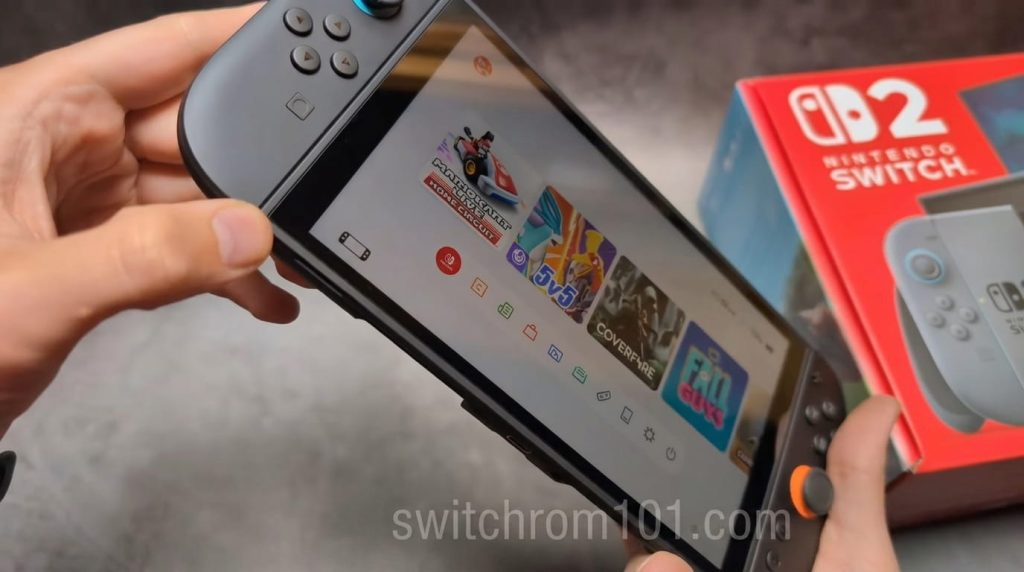
The instinct to peel off a scratched plastic film is understandable, but Nintendo’s warning is genuine. The factory film serves a real safety function: if the 7.9-inch LCD panel cracks from a drop or impact, the film keeps glass fragments contained and prevents them from cutting your hands or face. Removing it eliminates this protection entirely.
Instead, the correct solution is to apply a quality third-party screen protector on top of the factory film. Screen Rant reported that tempered glass screen protectors applied over the factory film can actually fill the scratches through adhesion, making existing scratches significantly less visible or invisible entirely.
Why Does My Ryujinx Keep Crashing? Troubleshooting and Fixes
5 best screen protectors for Switch 2 in 2026
All five below have been tested and reviewed by major publications including TechRadar, GamesRadar, and The Verge.
1. dbrand Prism 2.0 — best overall
The dbrand Prism 2.0 is TechRadar’s top pick after batch testing multiple models. It uses a custom drop-in-place recyclable frame that makes installation nearly foolproof — no alignment guesswork. The glass itself is 9H hardness with an oleophobic coating that resists fingerprints well. It is the most expensive option but the most consistent application experience. The only downside is it requires the frame system, so it is not the quickest application.
2. Belkin TemperedGlass — best value
The Belkin TemperedGlass uses a basic alignment frame (not the full drop-in system) but still applies cleanly. TechRadar’s batch testing rated it as one of the best performers despite its lower price. Belkin is an established brand with a warranty, which matters for a $449 console. Includes a squeegee for removing bubbles.
3. JSAUX Tempered Glass — best budget pick
JSAUX is a popular Switch accessory brand that delivers solid protection at a low price. This protector comes with cleaning materials, an alignment tray, and two protectors in the box — if you mess up the first application, you have a backup. The matte texture reduces glare in bright outdoor environments.
4. Genki Aegis Shield — runner-up
TechRadar’s second-place pick in accessory roundups. The Aegis Shield offers excellent scratch resistance and a smooth application, though it is slightly trickier to install than the Belkin model without the frame system. Still a premium choice for those wanting protection without the dbrand price tag.
5. amFilm Tempered Glass 2-Pack — most affordable
For budget-conscious buyers, the amFilm 2-pack delivers adequate 9H tempered glass protection at a price point that makes it easy to replace. Application alignment is manual (no frame), so take your time. The value comes from having two protectors for the price of one elsewhere.
How to apply a screen protector without bubbles — step by step
- Clean the screen surface with the provided microfibre cloth in small circular motions. Remove all fingerprints and dust.
- Use the provided dust removal sticker (most quality kits include one) to lift any remaining particles.
- If a drop-in frame is included (dbrand, JSAUX): place the frame around the console first, then peel the protector backing and drop it in.
- If applying without a frame: start from one edge (bottom or top) and slowly lower the protector at an angle to push air outward as you apply.
- Use the squeegee to press outward from the centre to the edges, pushing any remaining bubbles to the sides.
- Small bubbles near edges usually disappear within 24–48 hours as adhesive settles.
- Large bubbles indicate dust caught under the protector — lift carefully, remove the particle with tape, and reapply.
Best cases that protect the screen when stored
- TomToc Slim Case — hard outer shell, felt interior, 12 cartridge slots. Widely recommended by Switch 2 reviewers.
- Belkin Carrying Case — mesh pocket for accessories, soft interior, compact and lightweight.
- Nacon Hard Carrying Case — the hardest exterior shell for users who need maximum drop protection.
Frequently asked questions
Can I remove the factory film from Switch 2? Nintendo officially advises against this. The film is a safety feature that holds glass fragments if the screen breaks. Leave it on and apply a third-party screen protector over it.
Will a screen protector cover existing scratches? A tempered glass screen protector can fill shallow scratches through adhesion, making them less noticeable. Deep gouges will still be visible. Apply a protector as early as possible to prevent further scratching.
Are Switch 2 screen scratches covered by warranty? No. Physical damage including scratches is not covered by Nintendo’s standard warranty. Accidental damage cover (if purchased separately) may apply depending on your retailer.

(GameOverlord) has been involved in Nintendo Switch emulation
since 2019. She owns two Nintendo Switch consoles and a Steam Deck OLED,
and has hands-on tested over 40 Switch titles across Ryujinx and
Sudachi emulators. Her background is in consumer electronics and
she has followed emulation law developments in the US, UK, and EU
since the Yuzu shutdown in 2024. SwitchROM101 was built to fill the
gap left by misleading ROM sites — giving gamers accurate, legal,
and technically correct information without hosting any game files.