Best microSD Express Cards for Switch 2 in 2026: Tested After the Firmware 22 Issue
Firmware 22.0.0 note (March 2026): Some microSD Express cards — especially PNY 1TB — stopped working after the March 16 update. A PNY firmware fix is available. The cards recommended below have been reported as working without issues post-update. Always check for the latest community reports before purchasing.
Why Switch 2 requires microSD Express — not your old card
Standard microSD and microSDXC cards do NOT work for storing Switch 2 games. This catches many Switch 1 owners by surprise. Nintendo migrated to the microSD Express standard to support the faster read/write speeds that Switch 2 games require — particularly given titles like Final Fantasy 7 Rebirth (102GB) and Cyberpunk 2077 (90GB+).
The old microSD cards you used with Switch 1 are not entirely useless — you can still insert them into Switch 2 to access screenshots and videos stored on them. But they cannot store or run game data on Switch 2. You will need a microSD Express card for game storage expansion.
MicroSD Express uses the PCIe/NVMe interface, enabling read speeds up to 900 MB/s compared to standard microSDXC’s ~150 MB/s maximum. This makes a real difference for loading times in large open-world games.
How much storage do you actually need?
Switch 2 ships with 256GB of internal UFS 3.1 storage — far more than Switch 1’s 32GB. Nintendo claims you can download the entire 2025 launch library and still have over 70% storage remaining. However, if you plan to build a significant digital library, you will run out eventually.
| Switch 2 Game | Approximate Size |
| Final Fantasy 7 Rebirth | ~102 GB |
| Cyberpunk 2077: Ultimate Edition | ~90 GB |
| Mario Kart World | ~15 GB |
| Donkey Kong Bananza | ~12 GB |
| Zelda: Tears of the Kingdom (Switch 2 Ed.) | ~20 GB |
| Pokémon Pokopia | ~18 GB |
| Metroid Prime 4: Beyond | ~22 GB |
Practical recommendation: If you download mostly Nintendo first-party games and a few third-party titles, 256GB internal is adequate for 10–15 games. If you want AAA third-party titles (FFVII Rebirth, Cyberpunk, Resident Evil Requiem), a 512GB microSD Express card is the sweet spot. Heavy collectors should consider 1TB.
Why Does My Ryujinx Keep Crashing? Troubleshooting and Fixes
Best microSD Express cards for Switch 2 in 2026
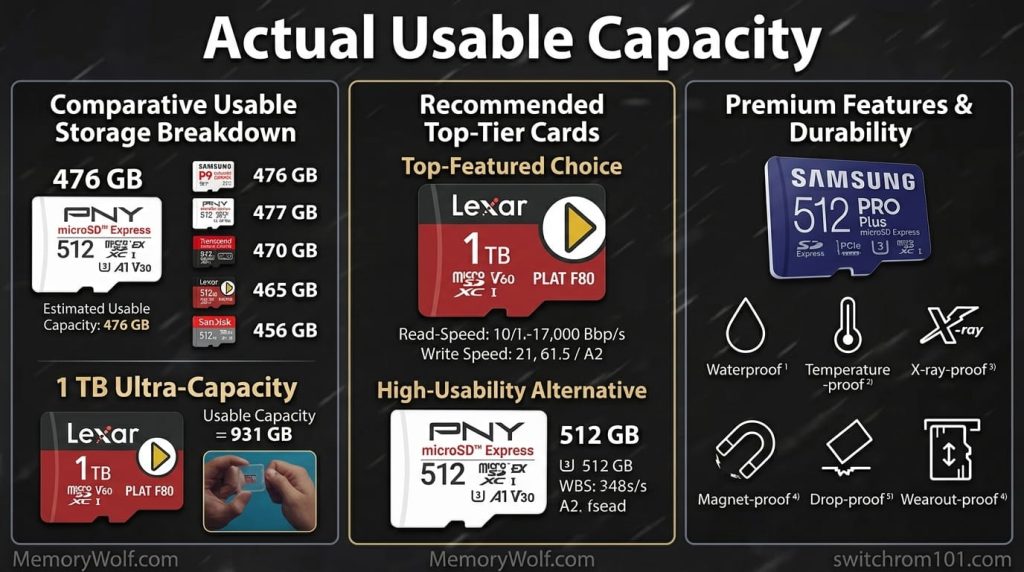
1. Samsung PRO Plus microSD Express — best overall
Samsung’s PRO Plus has been the most consistently recommended card in the Switch 2 community since launch, and remains so after the firmware 22.0.0 update with no reported compatibility issues. Available in 256GB and 512GB. Excellent read/write speeds, Samsung’s proven flash quality, and wide availability make it the default recommendation for most buyers. The 512GB is the best value option for most Switch 2 owners.
2. Lexar PLAY microSD Express — best budget pick
The Lexar PLAY is priced below the Samsung and delivers strong performance for Switch 2’s requirements. Available in 256GB. Community reports post-firmware 22 show no issues. If you need the most storage per dollar and do not need 1TB capacity, the Lexar PLAY 256GB is the best value in the category.
3. Nintendo-licensed microSD Express — safest choice
Cards sold directly by Nintendo or officially licensed partners are guaranteed compatible and are least likely to have firmware issues with Nintendo updates. They typically cost a premium over generic alternatives but provide peace of mind for users who do not want to manage compatibility concerns.
4. SanDisk microSD Express — reliable alternative
SanDisk (owned by Western Digital) has a long track record in storage products. Their microSD Express cards for Switch 2 perform well and have solid community reports. A good alternative if Samsung stock is unavailable in your region.
5. PNY 1TB microSD Express — only after firmware update
The PNY 1TB has the capacity advantage over competitors but was significantly affected by the firmware 22.0.0 issue. PNY released an official firmware update tool at pny.com/consumer/1tb-microsd-express-firmware. If you already own one, run the update. If buying new, check current community reports to confirm the issue is fully resolved before purchasing.
How to install a microSD Express card in Switch 2
- Power off the Switch 2 fully (hold power → Power Off — not Sleep or Restart).
- Lay the Switch 2 face-up and open the kickstand on the back.
- Locate the microSD slot on the right side under the kickstand (your console’s serial number is on the left side).
- Insert the card with the label text facing up (away from the console). Push in until you feel/hear a click.
- Close the kickstand. Power on the Switch 2.
- A prompt will appear asking if you want to use the card for game storage. Select Yes.
- The Switch 2 briefly formats the card for use. This takes about 30 seconds.
- Done. System Settings → System → Storage now shows the card capacity.

(GameOverlord) has been involved in Nintendo Switch emulation
since 2019. She owns two Nintendo Switch consoles and a Steam Deck OLED,
and has hands-on tested over 40 Switch titles across Ryujinx and
Sudachi emulators. Her background is in consumer electronics and
she has followed emulation law developments in the US, UK, and EU
since the Yuzu shutdown in 2024. SwitchROM101 was built to fill the
gap left by misleading ROM sites — giving gamers accurate, legal,
and technically correct information without hosting any game files.