Do Switch Controllers Work on Switch 2? Full Compatibility Guide (2026)
Quick answer: yes, Switch 1 controllers work on Switch 2
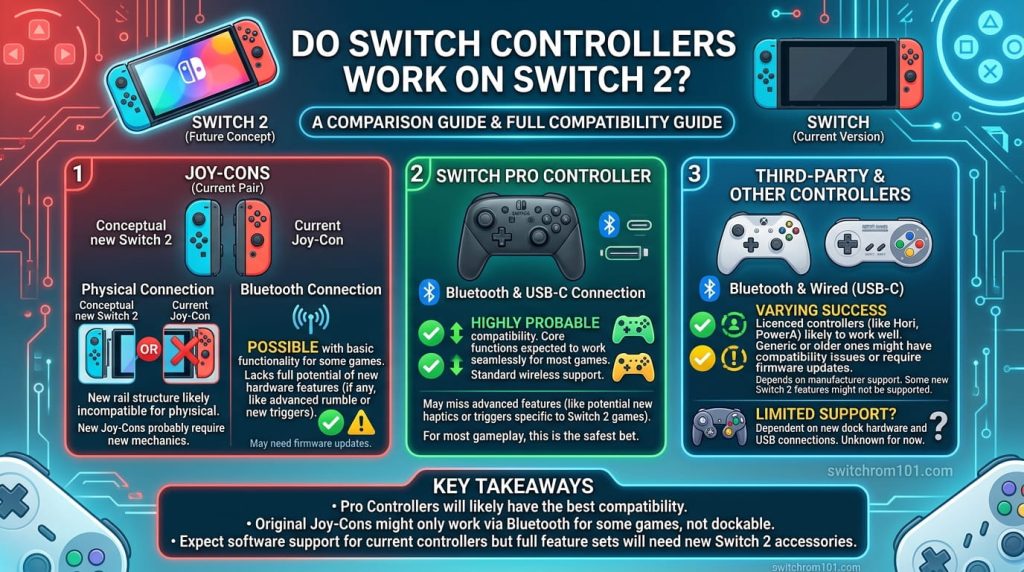
Nintendo confirmed that Switch 1 Joy-Cons and the Switch Pro Controller are compatible with the Switch 2. They connect wirelessly via Bluetooth — they cannot physically attach to the Switch 2 console itself because the Switch 2 uses a new magnetic connection system, not the sliding rail of the original Switch.
The only significant limitation is that Joy-Con 2 controllers (which come with the Switch 2) are NOT compatible with the original Switch 1.
Is Nintendo Switch 2 Backwards Compatible? Full Answer + Exceptions (2026)
Controller compatibility by type
Original Joy-Cons (Switch 1) on Switch 2
Yes — they work. Connect them wirelessly by going to Settings → Controllers → Change Grip/Order on your Switch 2 and pairing them as you would any wireless controller. You can use them with Switch 1 games and Switch 2 games alike.
What they cannot do on Switch 2:
- Physically slide onto the console (magnetic connectors only on Switch 2)
- Charge via the console (requires original charging grip or a separate charger)
- Use mouse mode (a Switch 2 Joy-Con 2 exclusive feature)
- Use the C Button for GameChat (Joy-Con 2 exclusive)
�� Some games specifically require original Joy-Cons due to IR camera or accessory requirements. See our backwards compatibility guide for the full list.
Switch Pro Controller on Switch 2
Yes — fully compatible. The Switch Pro Controller works wirelessly with the Switch 2 and functions in both Switch 1 and Switch 2 games. It is one of the most seamless controller upgrades in Nintendo history — if you already own one, you do not need to buy a new Pro Controller 2 immediately.
The only limitation is the absence of the C Button, which means you cannot use the GameChat feature directly from the Pro Controller. GameChat can still be accessed via the Switch 2 console itself.
Joy-Con 2 (Switch 2 controllers) on Switch 1
No — Joy-Con 2 controllers are not compatible with the original Nintendo Switch. The connection and controller protocols are different. There is no official or confirmed unofficial method to use Joy-Con 2 on Switch 1.
Pro Controller 2 on Switch 1
Not officially confirmed by Nintendo as of publication. The Switch 2 Pro Controller uses updated connectivity. It may work via wireless pairing on Switch 1 in some configurations, but Nintendo has not tested or guaranteed this.
Third-party Switch 1 controllers
Most third-party controllers that used Nintendo’s wireless protocols for Switch 1 are compatible with Switch 2 wirelessly, following the same rules as official Joy-Cons. Controllers using USB connection may also work via the Switch 2’s USB-C ports. Check with the specific controller manufacturer for confirmation.
Full compatibility summary table
| Controller | Works on Switch 2? | Notes |
| Switch 1 Joy-Con | ✅ Yes (wireless only) | Cannot attach to console or use mouse mode |
| Switch Pro Controller | ✅ Yes (wireless) | No C Button for GameChat |
| Joy-Con 2 | ❌ No on Switch 1 | Switch 2 only |
| Nintendo GameCube adapter | ✅ Yes | USB adapter confirmed compatible |
| NES controllers (NSO) | ✅ Yes (wireless) | Cannot attach to console |
| SNES controllers (NSO) | ✅ Yes (wireless) | Cannot attach to console |
| Most 3rd-party Switch 1 | ✅ Mostly yes | Verify with manufacturer |
How to connect Switch 1 Joy-Cons to Switch 2 — step by step
- On your Switch 2: go to Home Screen → scroll to Controllers → tap Change Grip/Order
- Press and hold the small circular sync button on your Joy-Con (on the side, near the SR button) until the green indicator light flashes
- The Switch 2 will detect the Joy-Con and add it as a paired controller
- Repeat for each additional Joy-Con
�� If a Joy-Con was previously paired to a Switch 1, hold the sync button for about 3 seconds to clear old pairing data before pairing to Switch 2.
Switch ROM: What It Is, How It Works & the Complete Legal Guide (2026)
Should you buy Joy-Con 2 or use your old ones?
If you already own Switch 1 Joy-Cons in good condition and do not care about mouse mode or GameChat: keep using them. They work perfectly for virtually all gameplay.
Consider buying Joy-Con 2 if: you want the mouse mode for strategy games, you play games that use the Switch 2’s new haptic features, or your existing Joy-Cons have drift issues and you want fresh controllers anyway.
Joy-Con 2 launched at around $79.99 per pair. The Switch 1 Pro Controller (still widely available) offers excellent value at $69.99 and is fully compatible.
Frequently asked questions
Do Joy-Cons from Switch OLED work on Switch 2? Yes. Switch OLED Joy-Cons are the same as standard Switch Joy-Cons and connect wirelessly to Switch 2 with identical compatibility.
Can 4 people play multiplayer on Switch 2 using old controllers? Yes. You can pair multiple sets of Switch 1 Joy-Cons plus Joy-Con 2 for multiplayer — they all work simultaneously.
Do Switch 1 controllers need firmware updates to work on Switch 2? No firmware update is required. They pair and function as-is.

(GameOverlord) has been involved in Nintendo Switch emulation
since 2019. She owns two Nintendo Switch consoles and a Steam Deck OLED,
and has hands-on tested over 40 Switch titles across Ryujinx and
Sudachi emulators. Her background is in consumer electronics and
she has followed emulation law developments in the US, UK, and EU
since the Yuzu shutdown in 2024. SwitchROM101 was built to fill the
gap left by misleading ROM sites — giving gamers accurate, legal,
and technically correct information without hosting any game files.